

.png)
Self-Custody Merchant Accounts 101: A Beginner's Guide to Bank-Free Business Operations
- [[[Free!!]<<<<]] Watch: 스포르팅 - 토트넘 Live Stream 13 September 2022
- 2 hours ago
- 4 min read
![Writer: [[[Free!!]<<<<]] Watch: 스포르팅 - 토트넘 Live Stream 13 September 2022](https://lh3.googleusercontent.com/a/AItbvmktwQc0wCdd3ZEETSYItRQubwwBzOyjD_dcigRf=s96-c)
Banks. Middlemen. Frozen accounts. Chargebacks.
Sound familiar?
If you're a merchant tired of playing by legacy financial rules, self-custody merchant accounts are about to change everything. No more waiting days for settlements. No more 3-4% getting skimmed off every transaction. No more asking permission to access your own money.
Welcome to bank-free business operations. Welcome to Web3.
What Exactly Is a Self-Custody Merchant Account?
Self-custody means one thing: you hold the keys.
Traditional merchant accounts? Your payment processor controls your funds. They decide when you get paid. They decide if your account gets flagged. They decide the fees.
Self-custody flips that script entirely.
With a self-custody merchant account, payments flow directly to your wallet. No intermediary touching your revenue. No third-party controlling access. Your business, your keys, your money.
The core principles are simple:
Complete control over incoming payments
Direct wallet deposits without processor delays
Zero freezes or account holds
Minimal fees compared to traditional interchange rates
For merchants seeking to reduce merchant interchange fees, this isn't just an upgrade. It's a revolution.
Why Traditional Merchant Accounts Are Broken
Let's talk numbers.
Average credit card processing fees: 2.5% to 3.5% per transaction.
That's before chargebacks. Before monthly fees. Before PCI compliance costs. Before the random "service fees" that appear on statements.
A business processing $500,000 annually? You're handing over $12,500 to $17,500 just for the privilege of accepting payments. Every. Single. Year.
And here's the real kicker: you don't control any of it.
Common merchant account nightmares:
Account frozen for "suspicious activity"
Rolling reserves held for 6+ months
Settlement delays during high-volume periods
Sudden fee increases with zero negotiation
Complete account termination without warning
Banks and processors treat merchants as liabilities. Self-custody treats you as a sovereign business owner.
How Self-Custody Merchant Accounts Actually Work
The mechanics are straightforward.
Customer initiates payment at your POS or checkout
Transaction broadcasts to the blockchain
Funds arrive directly in your merchant wallet
Settlement is instant: no T+2, no T+3, no waiting
No processor in the middle. No bank approving the transfer. Just peer-to-peer value exchange.

For crypto-native businesses, this is standard operating procedure. For traditional merchants making the switch? It's financial liberation.
Key infrastructure requirements:
Self-custody wallet (hardware or software)
Web3 payment gateway integration
Crypto POS system for small business operations
Stablecoin support for price stability
That last point matters. Volatility concerns are valid. That's why smart merchants use stablecoins like LUSD for day-to-day operations.
LUSD Stablecoin Benefits for Merchants
Here's where Larecoin changes the game.
LUSD isn't just another stablecoin. It's purpose-built for merchant operations. Price-stable. Fast settlement. Minimal gas fees.
LUSD stablecoin benefits include:
1:1 USD peg for predictable accounting
Gas-only transfers reducing transaction costs
Instant settlement to your self-custody wallet
Cross-border capability without currency conversion fees
Accepting crypto doesn't mean gambling on Bitcoin price swings. LUSD gives merchants the stability of dollars with the freedom of blockchain.

Built on Solana, transactions process in seconds. Not minutes. Not hours. Seconds.
For businesses exploring Web3 global payments, LUSD removes the volatility barrier entirely.
NFT Receipts for Accounting: The Game Changer
Traditional receipts? Paper or PDFs stored in folders. Easily lost. Easily disputed. Zero chain of custody.
NFT receipts for accounting changes everything.
Every transaction generates an immutable, on-chain receipt. Timestamped. Verified. Permanent.
What NFT receipts deliver:
Tamper-proof transaction records
Automatic audit trails
Simplified tax documentation
Dispute resolution evidence
Integration with Web3 accounting tools
Your accountant will thank you. Your auditor will thank you. Your sanity will thank you.
Larecoin's merchant portal generates NFT receipts automatically. No extra steps. No manual processes. Just clean, verifiable records for every sale.
Larecoin vs. The Competition
Let's compare alternatives.
NOWPayments alternative analysis:
NOWPayments offers crypto processing but relies on their custody infrastructure. Your funds route through their system before reaching you. That's not true self-custody.
CoinPayments alternative analysis:
Similar story. CoinPayments acts as the middleman. They hold funds, process conversions, then release to your wallet. Delays. Counterparty risk. Not bank-free.
Larecoin difference:
Direct wallet settlement. True self-custody. No intermediary holding your revenue.
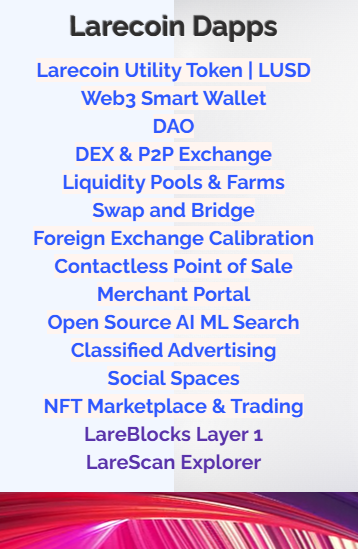
Plus Larecoin delivers:
Receivables token functionality for cash flow management
Contactless POS integration for brick-and-mortar
Smart wallet technology for enhanced security
DEX access for instant conversions
DAO governance for merchant community input
When evaluating a NOWPayments alternative or CoinPayments alternative, self-custody capability should be non-negotiable.
Getting Started With Bank-Free Operations
Ready to make the switch?
Here's your roadmap.
Step 1: Set Up Your Self-Custody Wallet
Hardware wallet recommended for maximum security. Software wallets work for smaller operations. Your keys, your responsibility.
Step 2: Integrate Web3 Payment Gateway
Connect Larecoin's merchant tools to your existing checkout. Works with e-commerce platforms. Works with physical POS systems. Works with invoicing.
Step 3: Configure Stablecoin Acceptance
Enable LUSD for price-stable transactions. Optional: accept BTC, ETH, SOL for crypto-native customers.
Step 4: Train Your Team
Basic wallet security. Transaction verification. Customer support protocols. Fifteen minutes of training covers 90% of scenarios.
Step 5: Go Live
Start accepting payments. Watch funds arrive instantly. Experience financial sovereignty firsthand.
Visit the Larecoin merchant setup to begin the process today.
The Future of Commerce Is Self-Custody
Banks had their run. Processors had their era.
The next decade belongs to merchants who control their own financial infrastructure.
Self-custody merchant accounts aren't just about reducing fees: though slashing costs by 50%+ is certainly attractive. They're about reclaiming autonomy. Building businesses without gatekeepers. Operating globally without borders.
What bank-free operations unlock:
Accept payments from 190+ countries without international processing fees
Settle in seconds instead of days
Eliminate chargeback fraud with blockchain finality
Keep more revenue with minimal transaction costs
Maintain complete financial privacy
The infrastructure exists today. The tools are ready. The only question: are you ready to take control?
Your Next Move
Self-custody isn't complicated. It's just different.
Different from the system designed to extract maximum fees. Different from processors who treat merchants as risk factors. Different from banks who freeze accounts first and ask questions later.
Larecoin built the full stack for bank-free business operations. Crypto POS systems for small business. Enterprise-grade merchant portals. NFT receipts for seamless accounting. LUSD for price stability.
Everything you need. Nothing you don't.
Explore the merchant dashboard and see what financial sovereignty looks like.
Your business. Your keys. Your rules.
Comments